
One tap to call for help, wherever you are
The call button, tonight's address and your GPS pin, together on one screen.
In an emergency, the last thing you want to do is dig through your phone for a hotel address you can't pronounce.
Tap the red Emergency button on Aixa's home screen. A big Call 112 button opens your dialler with the number ready, and you tap Call to connect. 112 works on mobile networks in many countries, and the screen shows a local emergency number underneath as a back-up if it doesn't connect. Below that, it shows where you're staying tonight, with Copy and Share buttons so you can pass the address to someone quickly. Under it, your GPS pin has a button that opens your position in Google Maps.
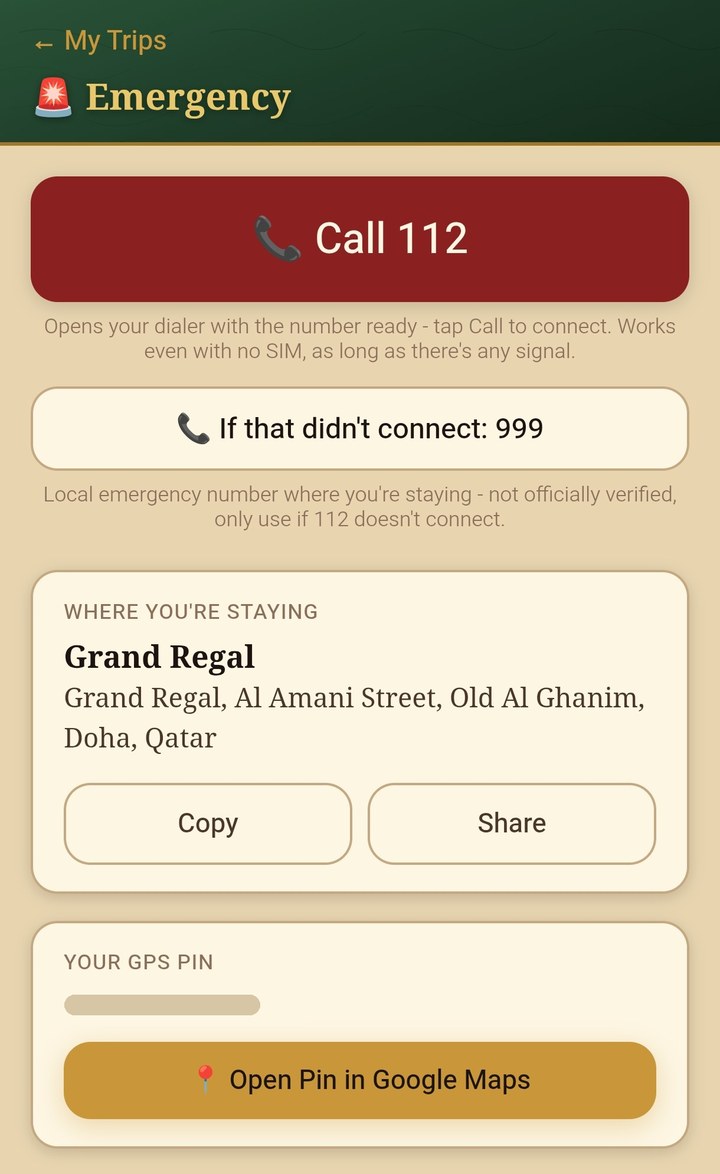
The Emergency screen works offline, so your address and the call button are there even with no data. Making the call still needs a phone signal, and in some countries a working SIM as well. The local number is a helpful back-up, not an official source, so always check the number for the country you're in. Everything stays on your phone, and Aixa never sends it to a server. The Emergency screen is free for everyone.
What is Aixa Travel Wallet?
Aixa Travel Wallet is a privacy-first travel organiser for Android. Keep your bookings and trip plans in one place, share a trip with the people you travel with, and carry a travel card for the friends you meet. Everything stays on your phone, and it's free to download.

We're working on an iPhone app for the App Store. Until it arrives, here's how to get Aixa on your iPhone.